What is 'good' editing? in Descript
Sep 18, 2026
Direct answer: In Descript (and in video generally), “good” editing depends on your audience and the type of video you are making. There is no single style that wins every time. Course demos need clear, illustrative edits; Shorts/TikTok often lean on high-retention elements; travel-style videos usually look best with minimal, raw cuts. Whatever the format, good editing stays subtle and non-distracting—and jump cuts are softened with a zoom in/out or a crossfade.
This beginner how-to is grounded in the Descript Made Easy lesson “What is ‘good’ editing?” (Intro to Video / Editing Theory).
This article was written with AI, based on a real Descript Made Easy lesson by the humans behind Descript Made Easy.
What does “good editing” actually mean?
The lesson’s short answer is: it depends. Seasoned editors still decide what works by watching how a change feels in the finished piece. For beginners, that means you start by naming who will watch and what kind of video you are making—then you choose edits that serve that job instead of copying someone else’s style blindly.
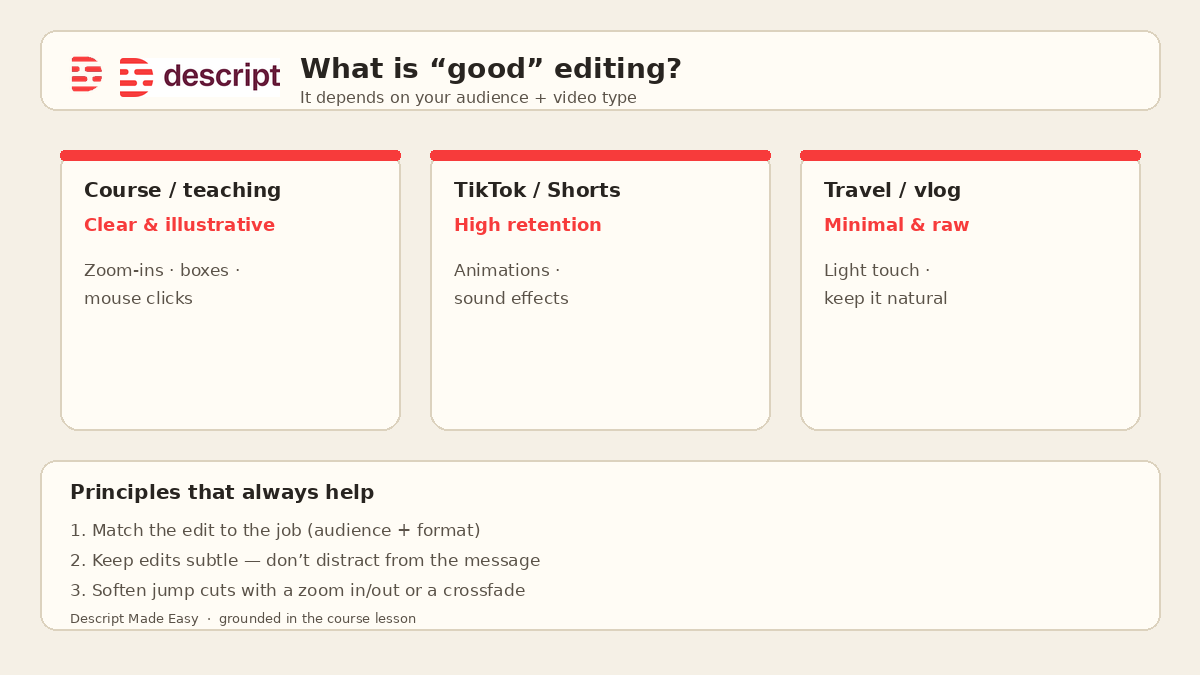
Match the edit style to the video type—then keep cuts subtle and cover jump cuts.
Watch: The Simple Truth About Video Editing
This clip from Descript Made Easy with Ross pairs well with the idea that “good” is not one universal look:

Watch on YouTube: The Simple Truth About Video Editing — then come back and match your own video type to the edit style below.
Optional: the source course lesson video is also on Kajabi (Wistia a4kueri6nt) if you are already enrolled in Descript Made Easy.
How do I choose an edit style for my video type?
Use the lesson’s examples as a starting map (not a rigid rulebook):
- Course / teaching demos — Prefer clear and illustrative edits: zoom-ins, highlight boxes, and visible mouse clicks so viewers can follow what you are pointing at.
- TikTok / short-form — Lean toward high-retention elements when they fit the piece: animations and sound effects that help people stay watching (without burying the message).
- Travel blog / raw lifestyle — Keep edits minimal and raw. Over-polishing can fight the feeling viewers came for.
- Always — Aim for subtle, non-distracting cuts. If a cut calls attention to itself for no reason, it is usually not helping.
Product reviews, craft demos, and other formats follow the same logic: show what the viewer needs to see (the product, the hands, the tool) and keep visual noise down.
Should I cover jump cuts with a zoom or a crossfade?
Yes—when a hard cut feels jumpy. The lesson’s practical fix is simple: avoid distracting jump cuts by zooming in or out, or by using a crossfade. Either softens the splice so the viewer stays with the story instead of noticing the edit.
Related call-room tip: if you are choosing between Smooth Jump Cuts and covering the cut yourself, start with a deliberate zoom or crossfade you can see and judge—then keep what feels subtle.
How to apply “good editing” in Descript (quick path)
- Name the video type and audience before you polish—course, Shorts, travel, review, craft, entertainment, etc.
- Pick the top priority for that piece (clarity, retention, raw authenticity, or showing a product/skill).
- Choose matching tools from the map above (illustrative zooms/boxes for teaching; light retention tools for short-form; minimal cuts for raw vlogs).
- Keep edits subtle—if a cut distracts from the message, simplify it.
- Soften jump cuts with a zoom in/out or a crossfade, then watch once for clarity before adding more effects.
Get the printable “good editing” checklist
Want a one-page checklist you can print and tick off while you decide style for your next video? Enter your email below—button copy is Get the checklist. Feel free to print it.
FAQ
Is there one “correct” editing style in Descript?
No. The lesson’s core point is that good editing depends on your audience and video type.
What edit style should I use for a course or screen demo?
Clear, illustrative edits—zoom-ins, boxes, and mouse clicks that help viewers follow along.
What about TikTok or YouTube Shorts?
High-retention elements like animations and sound effects can help when they fit; still keep the message easy to follow.
When should edits stay minimal?
Formats like travel blogs usually look best with minimal, raw editing so the piece still feels natural.
How do I fix a distracting jump cut?
Soften it by zooming in or out, or by adding a crossfade, so the cut is less obvious.
Where should I go next as a beginner?
Practice the Editing Cycle next, then rough-cut-to-final and style/swipe-file posts linked below—or use the Descript for Beginners hub.
Keep learning
- Descript for Beginners
- The Editing Cycle in Descript: Beginner Guide
- Rough Cut to Final Cut Using the Editing Cycle
- Develop Your Style and Get Ideas in Descript: Beginner Guide
- How to Navigate the Descript Editor (Beginner Guide)
- Free getting-started class
- Descript Made Easy
Want live help while you learn? Join the free 1-hour class: https://www.descriptmastery.com/getting-started-with-descript
Or go straight to Descript Made Easy: https://www.descriptmastery.com/
Check out the Descript Mastery School - my step-by-step blueprint for creating beautiful videos in 25% of the time.
Get 🔥 Descript tips!
Receive Descript tips, free resources, and easy-to-follow tutorials by email.
We hate SPAM. We will never sell your information, for any reason.