How to Style Your Descript Transcript: Bold, Italics, and Highlight Colors
Oct 05, 2026
Direct answer: To style your transcript in Descript, select the words you want to change. In the menu that pops up over your selection, click the B to bold them, the button next to it for italics, or the little colorful dot to highlight them (yellow is the default). Click the little down arrow next to the dot for other colors like red or orange, or to clear the highlight. Styling is mostly about looks, but bold and italics also show in your captions, and you can keep the formatting when you export the transcript to a Word document.
This article was written with AI, based on a real Descript Made Easy lesson by the humans behind Descript Made Easy.
What does styling your transcript actually do?
In the Styling Your Transcript lesson (Core Skills / Transcribing and Transcript Editing), Ross shows that you can style the transcript the way you would a Word document. He calls it “mostly aesthetic,” but it isn’t only for you: when he bolds or italicizes words, the captions change too. And if you export the transcript to a Word document, you can choose to keep that formatting. Styling changes how the words look. It doesn’t cut or change your video.
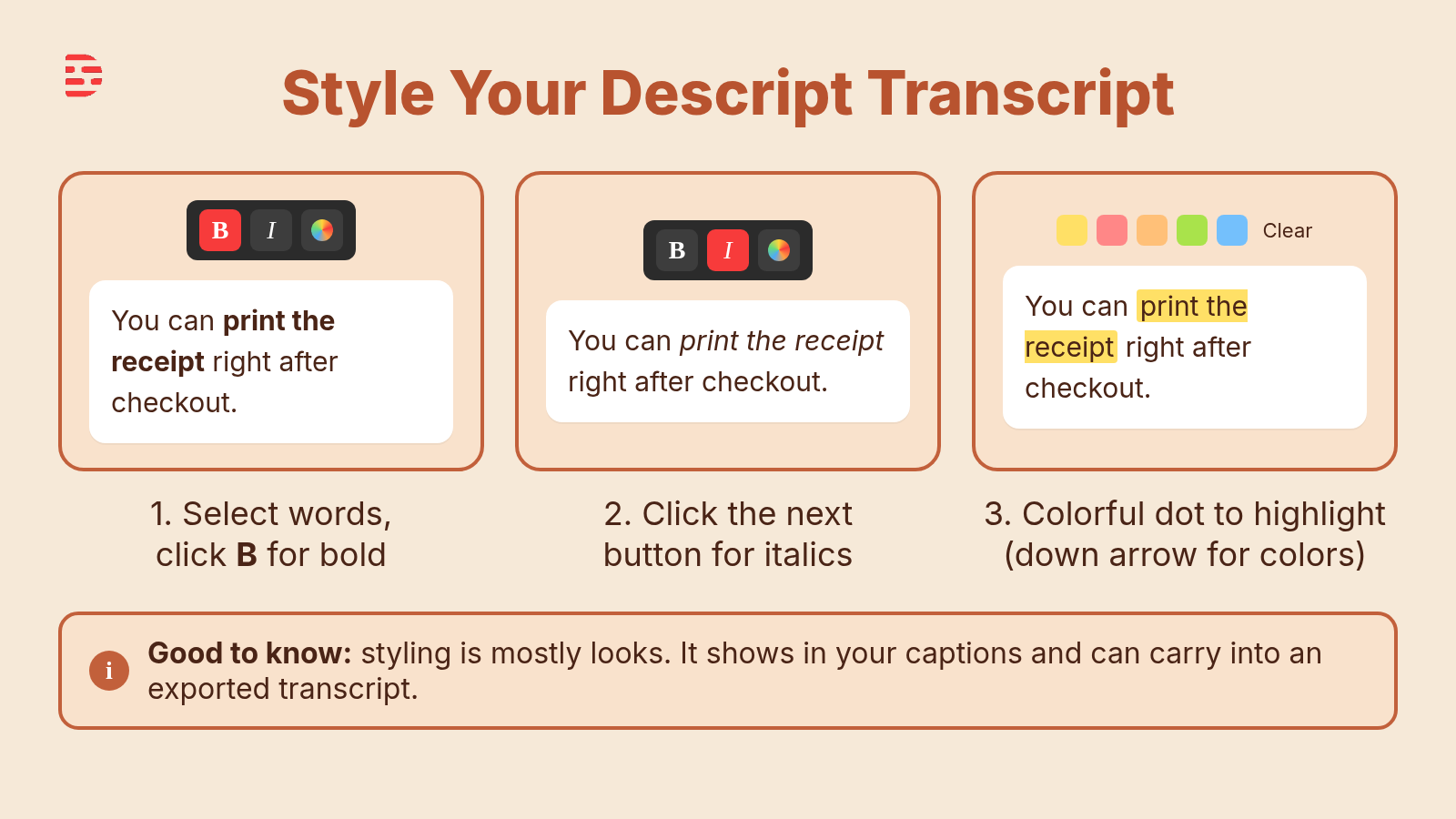
Select words, then use the pop-up menu: B for bold, the next button for italics, and the colorful dot for highlights.
How do I bold, italicize, or highlight words in a Descript transcript?
Try it on one sentence in your project:
- Select the words you want to style in the transcript. A menu pops up over your selection, the same one you use for other transcript edits.
- Click the B to bold them. The words turn bold in the transcript, and your captions get bolder too.
- Click the button next to B to italicize instead. The words are italicized in the transcript and in your captions.
- Click the little colorful dot to highlight. The default color is yellow, and your selection is highlighted as soon as you click.
- Click the little down arrow next to the dot to pick another color, like red or orange.
- Clear a highlight by selecting the words, opening that same down arrow, and choosing the clear option at the very bottom of the list.
Prefer the keyboard? Descript’s help center lists Command+B (Mac) or Control+B (Windows) for bold, Command+I or Control+I for italics, and Shift+Command+H or Control+Shift+H for highlight. See Descript keyboard shortcuts and Highlight text and copy highlights.
Will bold and italics show up in my captions?
Yes. In the lesson, bolding a phrase makes it bolder in the captions, and italicizing it italicizes the captions too. That makes styling a quick way to add emphasis to a key word on screen. If you only want to change how the transcript reads for yourself, keep in mind your viewers may see it in the captions.
Can I keep the formatting when I export the transcript?
Yes, if you want to. When you export the transcript to a Word document, you can choose to leave the formatting in, so your bold and italics come along. Ross’s summary: these styles affect how your captions look, how the transcript looks, and how the exported transcript looks “if you so choose.”
Should I style before or after I edit?
Get the words right first. Fix mistakes with Correcting the Transcript in Descript and take out what you don’t need with Deleting, Ignoring, Removing Words in Descript. Then style what’s left, so you aren’t decorating lines you’re about to cut.
Watch: the transcript lesson and a related video
The full Styling Your Transcript lesson video (about a minute and a half) is inside Descript Made Easy. The Descript Made Easy with Ross channel doesn’t have a video on transcript styling yet, so for more transcript habits watch 3 Must-Know Tips for Perfect Descript Transcripts, which includes exporting and using transcripts.
Get the printable Style Your Transcript checklist
Want a one-page checklist (select the words, bold with B, italics next to it, the colorful dot for highlights, the down arrow for colors or clearing, then check your captions and export)? Enter your email below and click Get the checklist. Feel free to print.
FAQ
Does styling my transcript change my video?
No. Bold, italics, and highlights change how the words look. In the lesson Ross calls them mostly aesthetic: they affect the transcript, the captions, and the exported transcript if you keep formatting.
Do bold and italics show in captions?
Yes. In the lesson, bolded words look bolder in the captions and italicized words are italicized in the captions too.
What color is a Descript highlight by default?
Yellow. Click the little down arrow next to the colorful dot to choose another color, such as red or orange.
How do I remove a highlight?
Select the highlighted words, open the little down arrow next to the colorful dot, and choose the clear option at the very bottom.
Can I keep bold and italics when I export a transcript to Word?
Yes. When you export the transcript to a Word document, you can choose to keep the formatting.
Keep learning
- Descript for Beginners
- Intro to the Transcript in Descript: Beginner Guide
- Correcting the Transcript in Descript: Beginner Guide
- Deleting, Ignoring, Removing Words in Descript: Beginner Guide
- Descript Help: Highlight text and copy highlights
- Free getting-started class
- Descript Made Easy
Want live help while you learn? Join the free 1-hour class: https://www.descriptmastery.com/getting-started-with-descript
Or go straight to Descript Made Easy: https://www.descriptmastery.com/
Check out the Descript Mastery School - my step-by-step blueprint for creating beautiful videos in 25% of the time.
Get 🔥 Descript tips!
Receive Descript tips, free resources, and easy-to-follow tutorials by email.
We hate SPAM. We will never sell your information, for any reason.